


















Table of Contents
- • iolo Review Summary
- • About iolo
- • Other opinions about iolo
- • Overview of iolo Software Solutions
- • iolo Review
- • iolo System Mechanic Ultimate Defense Review
- • iolo Privacy Guardian Review
- • iolo Software Pros & Cons
- • Service Structure
- • Usage Considerations
- • iolo Return Policy
- • iolo Digital Delivery of iolo Products
- • iolo Warranty
- • Contact Information for iolo Support
- • Where to buy iolo?
- • Conclusion of iolo reviews & ratings
iolo Review Summary
iolo is a software company specializing in PC optimization and security solutions. It generally offers integrated utility suites aimed at improving computer performance, privacy, and malware protection. Its products tend to provide noticeable speed enhancements on older PCs along with 24/7 technical support, though some limitations affect pricing and antivirus validation.
Highlights
- Suitable for Windows users seeking all-in-one PC maintenance
- Comprehensive suite covering optimization, security, privacy, and password management
- Higher cost and some software complexity may limit appeal
- Balanced utility suite with a 3.9/5 overall rating
Within the broader PC optimization category, iolo competes with free and lower-cost tools offering narrower features. The iolo review provides an impartial look at its strengths and trade-offs, useful for users weighing integrated solutions against alternatives.
About iolo
Many computer users face slow system performance, clutter, and security risks daily. These issues affect productivity and cause frustration with digital devices. Managing multiple maintenance and security tools can be complex and time-consuming.
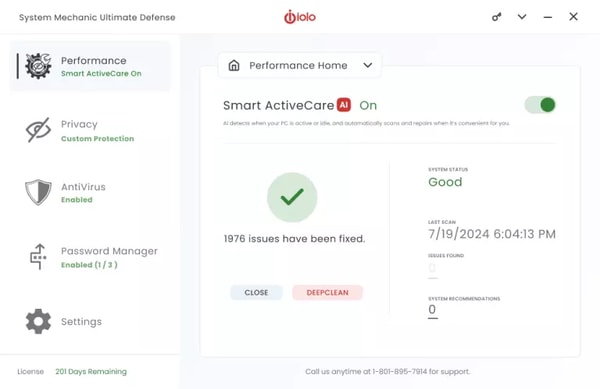
iolo develops software that helps optimize PC speed, enhance privacy, and protect against malware. Based in the United States, it focuses on integrated utility suites within the software industry. Their products are designed for Windows users needing comprehensive digital maintenance in one package.
iolo has earned recognition, including PC Magazine Editor’s Choice awards for eight straight years. Its System Mechanic suite has surpassed 100 million downloads worldwide, supported by generally positive user reviews. The company also offers 24/7 technical support to assist customers with software issues.
Users considering iolo should weigh the benefits of integrated optimization and security against its higher cost and some mixed reports regarding customer service. Potential technical risks, like registry cleaning, also deserve caution. More details can be found in the iolo review to help assess if it fits your needs.
Overview of iolo Software Solutions
iolo is a software company based in the United States specializing in PC optimization and security solutions. Founded in 1998, it operates under the parent company RealDefense LLC and offers its products primarily through direct digital downloads on its official website. The company’s software is designed to enhance computer performance and cybersecurity for Windows users globally.
Within the software industry, iolo focuses on providing integrated tools that cover system optimization, malware removal, privacy protection, and password management. Its products include multi-tier suites that cater to various levels of user needs, from basic maintenance to advanced security features. The company's business model centers on subscription-based sales supported by 24/7 technical assistance.
iolo operates as a mid-sized firm with a global user base and continuous software development efforts aimed at combining utility and security in one platform. Its operational approach emphasizes automation and ease of use, while its support infrastructure offers round-the-clock assistance. The iolo review highlights these structural and operational facets without promotional emphasis.
iolo Review
iolo is a software brand focused on providing integrated PC optimization and security solutions for Windows users. Its products aim to enhance system performance, improve privacy, and protect against malware. The brand is recognized for offering comprehensive tools in a single suite, supported by technical assistance. Customers highlight the value of its multi-device licensing and responsive support.

iolo’s software suite includes utilities for speeding up computer startup, removing malware, managing privacy settings, and securing passwords. The company emphasizes an all-in-one approach combining performance optimization with security features, supported by 24/7 technical assistance. The suite targets users seeking convenient and effective PC maintenance solutions through digital distribution.
iolo Highlights- Integrated optimization and security tools
- Multi-device licensing option
- 24/7 technical support availability
- Performance improvement features
- Comprehensive privacy management
iolo System Mechanic Ultimate Defense Review
System Mechanic Ultimate Defense is a comprehensive software suite aimed at home users who need all-in-one PC optimization and security across multiple devices. It enhances startup speed, removes malware, protects user privacy, and provides password management.
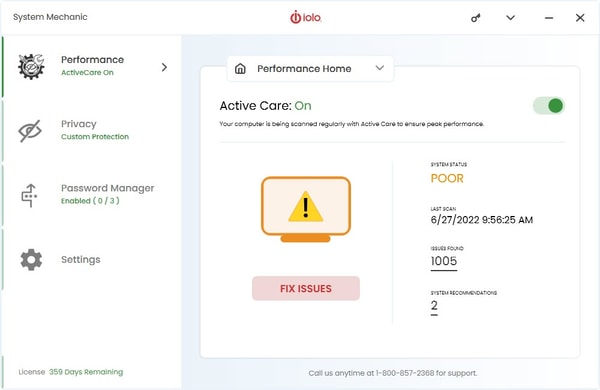
This product is a premium tier solution that supports up to 10 devices, integrating antivirus, VPN, cleanup utilities, and 24/7 technical support. The whole home license simplifies coverage for households with multiple PCs.
Priced at $67.93 annually, the software is delivered instantly via digital download from the official iolo website. It also includes a 30-day money-back guarantee for customer assurance.
Price $67.92 • secure1.iolo.com
iolo Privacy Guardian Review
Privacy Guardian is designed for users concerned about online tracking and data privacy. The software enables anonymous browsing and blocks ad-trackers to help protect user privacy.

It also offers protection against digital fingerprinting and includes safeguards against identity theft. The product supports up to 10 devices under a single subscription.
The annual subscription costs $31.95 USD and provides instant digital delivery through the official iolo website. This allows for quick access and installation on multiple devices.
Price $31.95 • secure1.iolo.com
iolo Software Pros & Cons
iolo offers effective PC performance improvements including faster boot times and a comprehensive suite that integrates optimization, antivirus, privacy, and password management. The Whole Home License enables coverage across multiple household devices, and 24/7 LiveTech technical support is included for ongoing assistance. Deep cleaning and registry optimization capabilities extend beyond built-in Windows tools, contributing to positive user feedback on ease of use and system speed.
While the software provides broad features suited to multi-device households, these benefits come with a higher cost compared to many competing suites. The antivirus component lacks independent lab certification, which may concern some users, and there are reports of aggressive upselling and intrusive marketing practices. Users should consider these trade-offs when evaluating iolo for PC maintenance and security needs.
- • Effective PC performance improvement
- • Whole Home License for multiple devices
- • Integrated optimization and security suite
- • 24/7 LiveTech technical support
- • Deep cleaning beyond Windows tools
- • Positive user feedback on ease of use
- • Comprehensive features for households
- • Higher price point
- • Antivirus lacks independent certification
- • Aggressive upselling and marketing
Service Structure
iolo operates on a subscription-based software sales model featuring annual renewals with an option for monthly LiveTech support subscriptions. Products are delivered digitally, allowing immediate access upon purchase from the official website. The company offers a Whole Home License that covers multiple devices within a single household. Subscriptions include automatic renewals to maintain continuous service access.
Technical support is available 24/7 via phone and live chat to assist with installation, license management, and troubleshooting. Dedicated customer and technical support ensure users have ongoing assistance when needed. Users are advised to review subscription terms carefully to avoid unexpected charges and ensure understanding of the service commitments.
Usage Considerations
iolo's software is designed for Windows PC users seeking an all-in-one solution for system maintenance, privacy, antivirus, and password management. It automates many optimization tasks to simplify use and improve system performance. Deep cleaning and real-time performance boosts are especially beneficial for older or slower PCs. However, registry cleaning carries some risk, so backing up the system before use is recommended.
Important Notes
Automated scans and one-click fixes help simplify maintenance, and the Whole Home License streamlines software licensing across multiple devices in a household. Users should be aware that registry cleaning may occasionally cause system instability, and the antivirus features have not been verified by independent tests. Potential users should weigh performance benefits against possible software complexity and variability in customer support experiences.
iolo Return Policy
iolo offers a 30-day money-back guarantee for products purchased through their official website. Customers can request a refund within 30 days from the date of purchase. There are no restocking or return fees mentioned in the available information. Users are advised to review subscription terms carefully before making a purchase.
The refund is available upon request within the guarantee period, with no specific exclusions documented in the provided data. The policy applies only to products bought directly from the official iolo website. For any issues related to refunds or cancellations, customers should follow the official support channels provided by iolo.
iolo Digital Delivery of iolo Products
iolo products are delivered exclusively through digital download immediately after purchase on the official website. The software is available globally with primary support offered in English, mainly for users in the USA and Canada. No physical shipments are involved in the delivery process.
Upon payment confirmation, customers receive instant access to download their software and an activation key online. There are no shipping fees, tracking, or carrier services associated with the delivery. Support and activation details are managed digitally through the iolo platform.
iolo Warranty
No detailed warranty coverage or duration specifics are provided in the available data. Refunds are covered by the 30-day money-back guarantee policy. Beyond this refund policy, there is limited information on warranty coverage. Users should not expect extended warranties unless explicitly stated at the time of purchase.
Coverage: Warranty information is minimal aside from the refund policy. Limitations: Standard software product terms likely apply without additional guarantees. For detailed warranty clarifications, users should consult official purchase documentation or contact support.
Contact Information for iolo Support
Users can reach iolo support through multiple channels, including phone, email, live chat, and an online contact form available on the official website. These options provide convenient ways to get assistance as needed.
- Phone: (801) 523-6763
- Email: [email protected]
- Live chat
- Online contact form
- Social media: Facebook, Instagram, LinkedIn, YouTube, TikTok
Customers are encouraged to contact support for help or inquiries. While response times typically occur within a week, some users have reported mixed experiences with support quality.
Where to buy iolo?
Users looking to acquire iolo products can do so directly through the official website, where iolo.com provides a structurally reliable platform with account management, clear policies, and access to technical support. Purchasing from this official source ensures immediate digital delivery and consistent customer service, although users should recognize that experiences may vary in third-party marketplaces, which may have different support and refund policies. There is no physical store presence, so offline service and availability are not applicable.
Conclusion of iolo reviews & ratings
iolo plays an important role in the PC optimization and security software category by offering an integrated suite that combines performance tuning, privacy tools, and antivirus features. The Whole Home License and round-the-clock technical support stand out as key strengths, providing convenience and comprehensive coverage. More information is available at iolo.com which presents their full product offerings and services.
Readers interested in a detailed perspective can explore the full range of insights on the iolo review page, where balanced feedback is available. This allows for an informed view of the software’s capabilities and limitations, helping users decide if it fits their particular needs without pressure or hype.
Editorial notes reflect aggregated buyer feedback and our independent editorial review of publicly available information. They are for informational purposes only and do not constitute endorsements. Purchases are made at your own discretion, and we are not responsible for transactions or outcomes related to this store. Experiences may vary. This content is assisted by AI and reviewed by our editorial team. While we strive for accuracy, AI-supported information may not always be 100% precise, so please verify any critical details.

